
Generative Engine Optimization
GEO means being cited when an AI tool generates an answer. Stackra checks your site against four independent signal groups -- bot access, schema readiness, entity clarity, and infrastructure -- and tells you exactly where your gaps are.
Free to sign up · Results in ~3 minutes
GEO is not the same as SEO
Traditional SEO
Optimizing to rank in a list of links. The goal is a high position in search results. The user clicks your link and lands on your site.
GEO
Optimizing to be cited in an AI-generated answer. The goal is to be the source an AI tool quotes when someone asks a relevant question. The user may never click — your brand is named in the answer.
Both matter. But they require different signals. A site that ranks well in Google may score poorly on GEO readiness if its structured data is thin, its entity information is ambiguous, or its content is locked behind JavaScript interactions that AI fetchers cannot see.
Four signal groups, assessed independently
Most audit tools that mention GEO check one thing: whether your robots.txt blocks Googlebot. Stackra checks four distinct groups and reports them separately so you can see exactly where your gaps are.
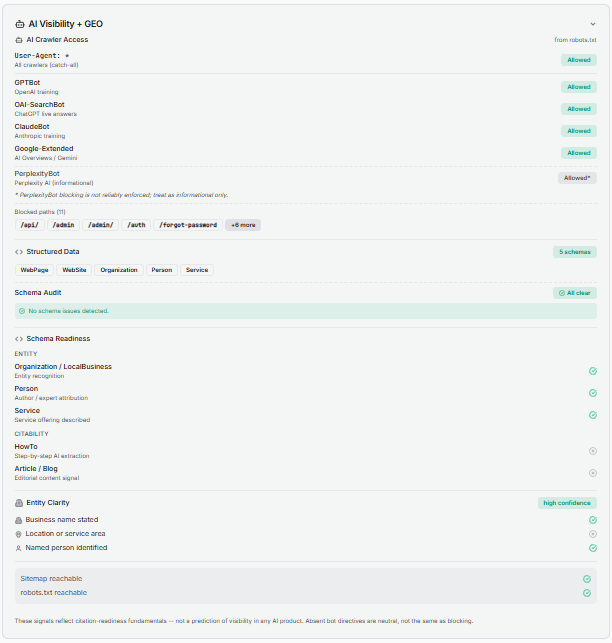
Group 1: AI bot access
The most foundational GEO signal. Stackra reads and parses your robots.txt and checks access for each major AI crawler independently — not just as a pass or fail on the file as a whole.
GPTBot
OpenAI training + ChatGPT Search
OAI-SearchBot
ChatGPT live web retrieval
ClaudeBot
Anthropic / Claude training
Google-Extended
Google AI Overviews + Gemini
PerplexityBot
Perplexity AI
Informational only — does not reliably honor robots.txt rules. Treat as advisory.
Naming each AI crawler explicitly in your robots.txt is more reliable than relying on the wildcard User-agent: * rule alone. Stackra's own robots.txt names 11 crawlers explicitly — the same practice we recommend.
Group 2: Schema readiness
Schema markup is the structured signal layer that tells AI tools what your content means, not just what it says. Stackra divides schema readiness into two sub-categories with different GEO functions.
Entity schemas
Establish who you are. AI tools use these to place your site in a knowledge graph and associate it with a real-world entity.
Organization
Primary entity signal for any business. Establishes your name, URL, description, and logo for AI knowledge graphs.
LocalBusiness
Extends Organization with address, phone, and hours. Use for any business with a physical location.
Person
For individual practitioners, consultants, and personal brands. Supports author attribution and expertise signals.
Citability schemas
Establish what you publish. These directly influence whether AI tools cite your pages when generating answers about topics your content covers.
Article / BlogPosting
Primary signal for editorial content. Applies to blog posts, guides, and opinion pieces.
HowTo
Highest citability signal for step-by-step instructional content. AI tools prioritize this for process and tutorial pages.
BreadcrumbList
Present in 47% of AI-cited pages. Signals site hierarchy. Detected and stored but excluded from the citability count (subpage schema).
FAQPage
Deprecated by Google for general sites (August 2023). Still counted for healthcare and government sites. Has residual value for Perplexity and ChatGPT.
Citability count: Stackra reports a citabilityTypeCount — the number of distinct active citability schema types detected. For most sites this ranges 0–2 (Article/BlogPosting and HowTo). Healthcare and government sites also count FAQPage, extending the range to 0–3.
Group 3: Entity clarity
Entity clarity answers whether AI tools can confidently identify who runs your site and where you operate. Detection is fully deterministic — no AI call is made. Stackra derives three signals from multiple layers, in order of specificity:
Business name
JSON-LD Organization/LocalBusiness name property → microdata itemprop → og:site_name, publisher tag
Location or service area
JSON-LD address, geo, areaServed → microdata address → geo.region, geo.placename meta tags
Named person
JSON-LD Person schema → microdata author itemprop → <meta name='author'>
Low
0 signals confirmed
Moderate
1 signal confirmed
High
2+ signals confirmed
Group 4: Supporting signals
Two infrastructure signals that determine whether AI crawlers can discover and fully index your site.
Sitemap reachable
Whether your sitemap.xml is present and returns a valid response. AI crawlers use sitemaps the same way Googlebot does — to discover pages they might not find through link crawling alone. WordPress (5.5+), Wix, Shopify, and Squarespace generate sitemaps automatically; custom-built sites and some older setups require manual generation. Submit yours to Google Search Console.
robots.txt reachable
Whether your robots.txt returns a valid response. A missing or unreachable robots.txt means crawlers fall back to permissive defaults — but it also signals a configuration gap that affects how reliably your access rules are enforced.
Stackra audits Stackra
Stackra's own site is structured against the same GEO signals it checks. When we run stackra.app through the scanner, the expected output is:
All major AI crawlers explicitly allowed in robots.txt (11 named stanzas)
Organization schema on the homepage with name, URL, description, logo, and sameAs to Product Hunt
Person schema on the About page and blog posts (founder as named entity with LinkedIn sameAs)
BlogPosting schema on every article — citabilityTypeCount: 1/2 at article level
Entity clarity: high confidence (business name + named person confirmed)
Sitemap and robots.txt both reachable and cross-referenced
We also document what we intentionally omit: LocalBusiness schema (Stackra is a SaaS product, not a physical location), FAQPage schema (deprecated for general sites), and HowTo schema (our blog content is not currently structured in the step-by-step format HowTo requires). Accurate schema is better than inflated schema.
What you can actually do — by platform
Your platform determines which GEO signals you can control. None of the following require a developer.
WordPress
Full server-level control. Every GEO signal is addressable through free plugins.
AI bot access
Install Rank Math or Yoast SEO. Both include a robots.txt editor in the WordPress admin. Add explicit Allow rules for GPTBot, OAI-SearchBot, ClaudeBot, and Google-Extended.
Organization schema
Rank Math's Knowledge Graph settings output correct JSON-LD automatically from your business name, type, logo, and description. Yoast equivalent is under SEO > Search Appearance > Knowledge Graph & Schema.
Article schema on content pages
Rank Math and Yoast both apply Article or BlogPosting schema to posts automatically. Verify your content type is set correctly in each plugin's schema settings.
JavaScript content visibility
Standard themes render content in initial HTML. If you use Elementor or third-party accordion plugins, verify FAQ sections use native HTML details/summary elements — not JavaScript click-reveal components invisible to AI fetchers.
Wix
Strongest built-in GEO capability of any managed platform. Most signals are configurable without code.
AI bot access
Wix provides a robots.txt editor at Settings > SEO > robots.txt. Add allow rules for GPTBot, OAI-SearchBot, ClaudeBot, and Google-Extended.
Organization/LocalBusiness schema
Wix auto-generates Organization or LocalBusiness schema from your business information. Complete all fields under Settings > Business Info — this feeds the schema automatically. Verify output with Google's Rich Results Test.
Custom schema
Wix's Structured Data Markup tool (Marketing & SEO > SEO Tools > Structured Data) supports HowTo blocks for step-by-step content. No code required.
Content visibility
Native Wix blocks are generally crawler-readable. If you have embedded third-party JavaScript widgets for accordions or tab content, verify the text is present in the page HTML, not injected after load.
Squarespace
AI bots allowed by default. Schema basics are handled by the platform. Custom schema requires code injection.
AI bot access
Squarespace generates robots.txt automatically. The default allows all crawlers including AI bots. No action required unless you have previously customized it.
Organization schema
Squarespace auto-generates basic Organization markup from your site settings. Complete your business name, description, and contact details under Settings > Business Information.
Custom schema
JSON-LD can be injected via Settings > Advanced > Code Injection. For HowTo pages or step-by-step service guides, this is the only way to add instructional content signals.
Content visibility
Native FAQ and accordion blocks keep content in HTML. Third-party JavaScript components embedded via code blocks may hide text from AI crawlers.
Shopify
Strong defaults on schema and crawl access. Security headers and some structured data are platform-managed.
AI bot access
Shopify's default robots.txt permits all crawlers. The platform manages robots.txt — if you have a custom robots.txt liquid template, verify AI crawlers are not blocked.
Product and Organization schema
Shopify injects Product and Organization schema automatically for product and storefront pages. For additional schema types (HowTo, BlogPosting), use a schema app or manually add JSON-LD via theme code.
Blog and content pages
Shopify's native blog pages support Article-style content. Use the blog for substantive guides and how-to content. AI tools can crawl and cite well-structured Shopify blog posts.
Security header limitation
Shopify blocks custom HTTP security headers on standard plans. When Stackra flags a security header gap on Shopify, it is pointing at a platform ceiling — not something you can add without moving to Shopify Plus.
See also: WordPress platform guide · Shopify platform guide · Wix platform guide
Six mistakes that hurt GEO readiness
Relying on the wildcard User-agent: * rule
The wildcard covers AI bots by default, but naming each crawler explicitly in your robots.txt is more reliable. AI crawlers are more likely to have directives respected when explicitly addressed.
Click-to-reveal content invisible to AI crawlers
FAQ sections and tabs that only show text after a JavaScript click event are invisible to AI fetchers. Use native HTML <details>/<summary> elements, or ensure the content is present in the initial HTML.
Schema present but mistyped
Subtypes like Restaurant or MedicalClinic are valid LocalBusiness subtypes, but an exact Organization or LocalBusiness type is what Stackra counts for entity presence. Validate your schema output with Google's Rich Results Test.
Entity information incomplete
Organization schema with only a name and URL leaves location and authorship unconfirmed. Each additional confirmed signal (location, named person) raises entity confidence — high confidence is the target for clear AI attribution.
Adding FAQPage schema to a general business site
Google deprecated FAQPage rich results for non-healthcare, non-government sites in August 2023. Adding it does not improve your visibility in Google AI Overviews and may signal outdated practices. FAQPage still has residual value for Perplexity and ChatGPT, but it is not a priority for most sites.
Ignoring sitemap submission
Your sitemap lets AI crawlers discover pages they may not find through link crawling alone. Submit yours to Google Search Console and confirm it is referenced in your robots.txt. WordPress (5.5+), Wix, Shopify, and Squarespace generate sitemaps automatically — custom-built sites and some older setups do not.
Priority order for GEO readiness
Confirm your sitemap exists and is submitted in Google Search Console
WordPress (5.5+), Wix, Shopify, and Squarespace generate one automatically. Custom-built sites need manual creation.
Verify major AI crawlers are allowed in your robots.txt
GPTBot, OAI-SearchBot, ClaudeBot, and Google-Extended. Name them explicitly if possible.
Complete your business name, location, and description in your platform settings
WordPress (Rank Math Knowledge Graph), Wix (Settings > Business Info), Squarespace (Settings > Business Information). These auto-generate Organization or LocalBusiness schema.
Add Article or BlogPosting schema to content pages
Rank Math and Yoast do this automatically on WordPress. Wix applies it to blog posts natively. This is the primary citability signal.
Add HowTo schema to any step-by-step guides or service pages
Highest citability signal. Rank Math, Wix Structured Data tool, or Squarespace code injection.
Check that FAQ sections use HTML — not JavaScript click-reveal
Content that only appears after a user click is invisible to AI fetchers. Use native details/summary elements.
Run a Stackra scan to see your current GEO signal evidence
Bot access per crawler, schema detected, entity confidence level, and supporting signal status — all in one view.
Related reading
What Is GEO?
How generative engine optimization differs from traditional SEO and why it matters for search visibility in 2026.
What Stackra Detects for GEO
A technical walkthrough of the four signal groups: bot access, schema readiness, entity clarity, and supporting signals.
GEO for Small Businesses
Platform-specific steps for WordPress, Wix, and Squarespace — no developer required.
See your GEO signals in under two minutes
Enter your URL and Stackra checks all four signal groups: bot access per crawler, schema by function, entity clarity confidence, and infrastructure readiness.